
How to Estimate Your California Taxes Using an Online Calculator?
Step-By-Step Instructions:
This guide shows you how to use an online California tax calculator to estimate your income taxes. It helps you understand your potential tax liability based on your income, filing status, and deductions.
The California tax calculator estimates your federal, state, and total tax burden based on key inputs like income, filing status, and deductions.
Website:
California Tax Calculator
Step 1
Step 2
Enter Your Income:
- Input your annual household income
- This is your total earnings before taxes
Step 3
Select Filing Status:
Choose the correct option:
- Single
- Married
Step 4
Open Advanced Section, if needed (Optional):
You may be able to adjust:
- 401(K) Contribution
- IRA Contribution
- Itemized Deductions
- Number of State Personal Exemptions
The calculator uses these to estimate your taxable income.
STEP 5
Review Your Results:
The calculator will show:
- Estimated state income tax
- Estimated federal tax
- Effective and marginal tax rates
- Total tax burden
- Take-home income
Step-By-Step Instructions:
Step 1: Open the Calculator:
Go to the SmartAsset California Tax Calculator page.
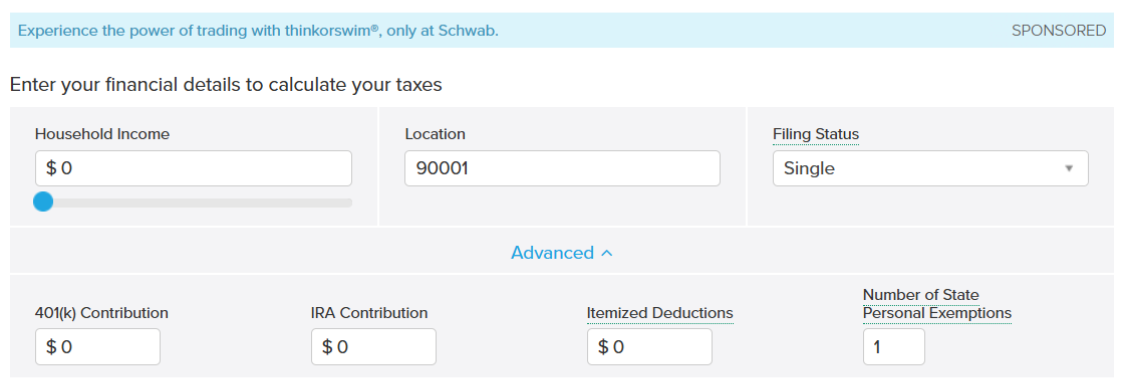
Step 2: Enter Your Income:
- Input your annual household income
- This is your total earnings before taxes
Step 3: Select Filing Status:
Choose the correct option:
- Single
- Married
Step 4: Open Advanced Section, if needed (Optional):
You may be able to adjust:
- 401(K) Contribution
- IRA Contribution
- Itemized Deductions
- Number of State Personal Exemptions
The calculator uses these to estimate your
taxable income.
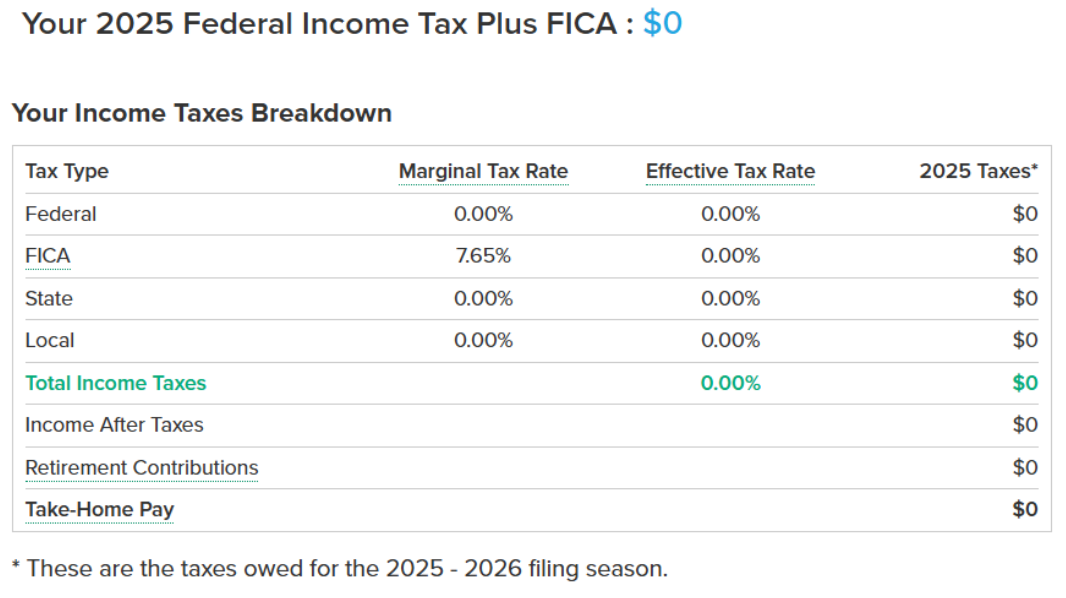
Step 5: Review Your Results:
The calculator will show:
- Estimated state income tax
- Estimated federal tax
- Effective and marginal tax rates
- Total tax burden
- Take-home income
Contact sales
We’d love to see how we can streamline your hiring together.
Request a demo
Contact sales
We’d love to see how we can streamline your hiring together.
Request a demo
Contact sales
We’d love to see how we can streamline your hiring together.